
What is the Fake or Real Challenge?
As artificial intelligence and deepfake technologies become more advanced, cyber threats are evolving beyond traditional text-based phishing emails. Fake or Real is an interactive, gamified challenge designed to sharpen your team's instincts against modern, visual AI scams.
Rather than just watching a standard training video, users are presented with a rapid-fire mix of genuine and AI-generated media (such as deepfake videos) and are tasked with spotting the fakes. This quick, hands-on scenario provides a few core benefits:
- Active Engagement: It transforms passive learning into a fun, interactive game.
- Skill Building: It trains employees to look for the subtle anomalies and technical glitches often found in manipulated media.
- Real-World Readiness: It proactively boosts awareness of AI-driven fraud and visual scams before employees encounter them in the wild.
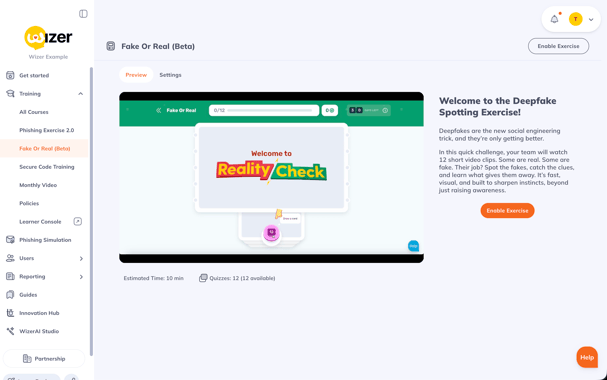
How to Enable Fake or Real
Activating this challenge for your organization is a quick and straightforward process. Follow these steps to enable it within your Wizer environment:
- Log in to your Wizer Admin Console.
- Navigate to the left-hand menu and expand the Training tab dropdown.
Click on the Fake or Real tab. - Click Enable Exercise.
- Configure the settings to your liking, then click Start Exercise.
Once enabled, your users will be able to access the interactive challenge and begin testing their ability to spot AI-generated fakes.